Any window from your Mac, on your iPhone and iPad
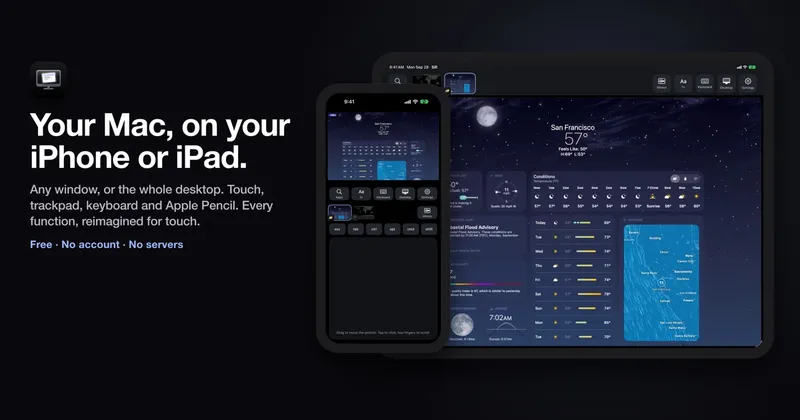
Sill is a free, open-source Mac, iPhone, and iPad application that streams either one Mac window or the entire desktop to a paired mobile device and returns touch, keyboard, trackpad, mouse, scrolling, and Apple Pencil input to the Mac. Sill for Mac captures content with ScreenCaptureKit, encodes it as HEVC using VideoToolbox, and sends it directly to the iPhone or iPad app over TLS 1.3. It drops delayed frames rather than queueing them to keep the displayed image current. The software works on Apple-silicon Macs running macOS 14 or later and iPhones or iPads running iOS or iPadOS 17 or later. Devices can connect over a shared local network, USB, peer-to-peer Wi-Fi through Direct Wireless Connection, or a user-managed VPN or forwarded router port with Remote Access enabled. Each device is paired once using a 12-digit code or USB, and subsequent connections are pinned to the paired keys. Sill has no account, intermediary server, ads, tracking, or subscription. It supports bidirectional text clipboard sharing up to 256 KB, but does not stream Mac audio and shows only one window or the desktop at a time. The Mac app requires Screen Recording and Accessibility permissions; the latter lets it generate mouse and keyboard events and resize streamed windows. Sill is available as a notarized Mac download, through Homebrew, and as a free iPhone and iPad App Store app under the Apache 2.0 license.
github.com
9 min
19h ago
Claude Code Remote Control
Remote Control allows users on Pro and Max plans to access their full local environment remotely, including filesystems, MCP servers, tools, and project configurations. It synchronizes conversations across connected devices, enabling seamless communication from terminals, browsers, and phones, and maintains session continuity during interruptions such as laptop sleep or network drops.
code.claude.com
4 min
2/25/2026
Any window from your Mac, on your iPhone and iPad
Sill is a free, open-source Mac, iPhone, and iPad application that streams either one Mac window or the entire desktop to a paired mobile device and returns touch, keyboard, trackpad, mouse, scrolling, and Apple Pencil input to the Mac. Sill for Mac captures content with ScreenCaptureKit, encodes it as HEVC using VideoToolbox, and sends it directly to the iPhone or iPad app over TLS 1.3. It drops delayed frames rather than queueing them to keep the displayed image current. The software works on Apple-silicon Macs running macOS 14 or later and iPhones or iPads running iOS or iPadOS 17 or later. Devices can connect over a shared local network, USB, peer-to-peer Wi-Fi through Direct Wireless Connection, or a user-managed VPN or forwarded router port with Remote Access enabled. Each device is paired once using a 12-digit code or USB, and subsequent connections are pinned to the paired keys. Sill has no account, intermediary server, ads, tracking, or subscription. It supports bidirectional text clipboard sharing up to 256 KB, but does not stream Mac audio and shows only one window or the desktop at a time. The Mac app requires Screen Recording and Accessibility permissions; the latter lets it generate mouse and keyboard events and resize streamed windows. Sill is available as a notarized Mac download, through Homebrew, and as a free iPhone and iPad App Store app under the Apache 2.0 license.
github.com
9 min
19h ago
Claude Code Remote Control
Remote Control allows users on Pro and Max plans to access their full local environment remotely, including filesystems, MCP servers, tools, and project configurations. It synchronizes conversations across connected devices, enabling seamless communication from terminals, browsers, and phones, and maintains session continuity during interruptions such as laptop sleep or network drops.
code.claude.com
4 min
2/25/2026
Any window from your Mac, on your iPhone and iPad
Sill is a free, open-source Mac, iPhone, and iPad application that streams either one Mac window or the entire desktop to a paired mobile device and returns touch, keyboard, trackpad, mouse, scrolling, and Apple Pencil input to the Mac. Sill for Mac captures content with ScreenCaptureKit, encodes it as HEVC using VideoToolbox, and sends it directly to the iPhone or iPad app over TLS 1.3. It drops delayed frames rather than queueing them to keep the displayed image current. The software works on Apple-silicon Macs running macOS 14 or later and iPhones or iPads running iOS or iPadOS 17 or later. Devices can connect over a shared local network, USB, peer-to-peer Wi-Fi through Direct Wireless Connection, or a user-managed VPN or forwarded router port with Remote Access enabled. Each device is paired once using a 12-digit code or USB, and subsequent connections are pinned to the paired keys. Sill has no account, intermediary server, ads, tracking, or subscription. It supports bidirectional text clipboard sharing up to 256 KB, but does not stream Mac audio and shows only one window or the desktop at a time. The Mac app requires Screen Recording and Accessibility permissions; the latter lets it generate mouse and keyboard events and resize streamed windows. Sill is available as a notarized Mac download, through Homebrew, and as a free iPhone and iPad App Store app under the Apache 2.0 license.
github.com
9 min
19h ago
Claude Code Remote Control
Remote Control allows users on Pro and Max plans to access their full local environment remotely, including filesystems, MCP servers, tools, and project configurations. It synchronizes conversations across connected devices, enabling seamless communication from terminals, browsers, and phones, and maintains session continuity during interruptions such as laptop sleep or network drops.
code.claude.com
4 min
2/25/2026
No more articles to load