An ad-free Android TV
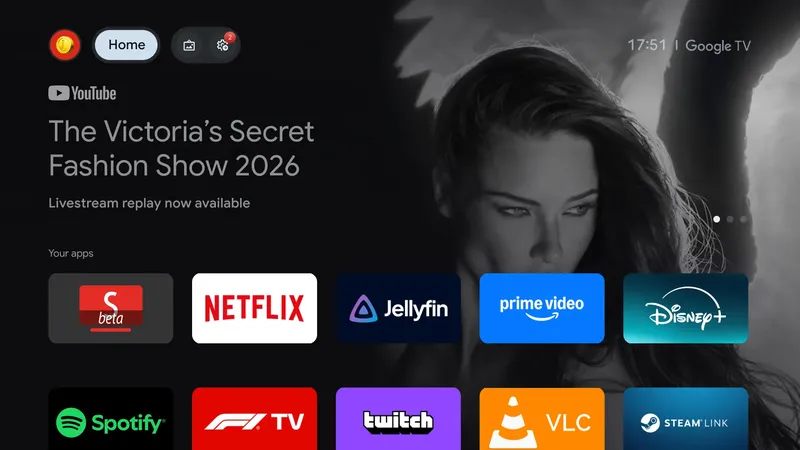
cretezy.com
October 19, 2026
4 min read
53/100
Summary
A configuration for Android TV replaces Google TV’s promotional home-screen banner and the official YouTube app with third-party software. Projectivy Launcher becomes the home screen and displays installed apps without the Google TV banner, while SmartTube replaces YouTube and includes ad blocking, a different interface, and SponsorBlock. Wholphin serves as a Jellyfin client, and Button Mapper can redirect a remote’s YouTube button to SmartTube. The setup was used on two Chromecasts with Google TV and a Hisense TV, and is presented as compatible with most Android TV devices. Projectivy, Wholphin, and Button Mapper are available through the Play Store; SmartTube can be sideloaded with Downloader. Android Debug Bridge commands enable wireless or USB debugging, disable Google’s stock launcher and its restoring package, set Projectivy as the home activity, and remove or disable the official YouTube TV package. The instructions warn that the stock launcher may manage HDMI input switching on some TVs. Button Mapper and Projectivy require accessibility services, and Button Mapper can receive WRITE_SECURE_SETTINGS permission and a battery-optimization exemption. The configuration can be reversed by re-enabling disabled packages or reinstalling the existing YouTube package for the primary user.
Key Takeaways
- Projectivy Launcher can replace Google TV’s stock home screen after the stock launcher packages are disabled through ADB and Projectivy is set as the home activity.
- SmartTube can replace the official YouTube TV app and provides ad blocking and built-in SponsorBlock, according to the setup instructions.
- Button Mapper can remap an Android TV remote’s YouTube button to launch SmartTube after its accessibility service is enabled.
- ADB wireless debugging requires Wi-Fi; devices without it can use USB debugging and an ADB connection on port 5555.
- Disabling the stock Android TV launcher can affect HDMI input switching on TVs where that launcher manages inputs.
What the discussion said
The AI angle in the thread was narrow but lively: readers fixated on the article’s suggestion that a coding agent could drive the Android Debug Bridge setup for an ad-free TV. Skeptics saw that as an alarming escalation from running a script fetched from the internet: instead of inspecting a bounded command sequence, users would hand device control to a probabilistic system that can interpret instructions, make mistakes, and potentially act on malicious or misleading content. The objection was not merely that AI consumes more compute; it was that installation steps should be predictable, reviewable, and constrained. Others supplied a concrete counterexample rather than abstract AI boosterism. One reader described using an agent to recover a broken Chromecast media-client update: it acquired and modified an application package, then checked the television display with screenshots until the interface was usable. That experience made the agent look like a practical accessibility layer for fiddly TV maintenance, especially for people unwilling or unable to operate a command line. Commenters therefore agreed that AI can lower the barrier to custom TV setups, but split sharply on whether that convenience justifies granting an autonomous, nondeterministic tool authority over a personal device. The broader complaints about advertisements and sluggish TV interfaces drew far more consensus, but did not substantially turn into an AI discussion.
Where opinion split
The core dispute is whether an AI agent should be trusted to execute TV-configuration commands. Critics argue that device setup needs deterministic, auditable actions and that an agent creates many new routes to destructive failure; supporters argue that agents can safely absorb tedious technical work, diagnose broken media apps, and verify the fix visually without requiring command-line expertise.
Coverage & discussions
Hacker News · cretezy.com
Community discussions
Community Sentiment
Positives
- AI agents can turn brittle Chromecast repair work into a hands-off recovery flow, fetching and fixing a broken media app before validating the result from on-screen screenshots.
- For nontechnical TV owners, an agent-guided ADB setup could make privacy-oriented launcher and app changes reachable without learning a command-line toolchain.
Concerns
- Giving a probabilistic agent control over installation commands replaces a reviewable procedure with an opaque chain of decisions that can damage a device or expose its data.
- The agent proposal drew security alarms because prompt injection, mistaken interpretation, and unsafe command execution create far more failure paths than a manually inspected script.
Related Articles
Tooltips need a delay, and then they need to skip it
Aug 25, 2026

What we lost when search stopped making us think
Aug 21, 2026
Kagi added a setting for removing paywalled links from search results
Aug 21, 2026

HackEurope 2026: A short rant on AI and hackathons
Aug 17, 2026
Google Search Is Dying. What Comes Next Is Worse
Aug 10, 2026