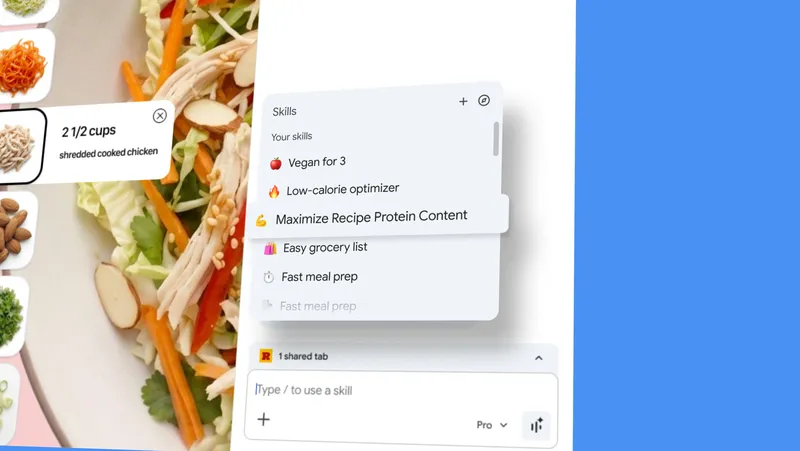
Turn your best AI prompts into one-click tools in Chrome
blog.google
April 14, 2026
2 min read
🔥🔥🔥🔥🔥
57/100
Summary
Skills in Chrome allows users to save and reuse AI prompts for various tasks, streamlining the process of accessing AI assistance across different web pages. This feature enhances productivity by enabling one-click execution of previously used prompts.
Key Takeaways
- Google launched "Skills in Chrome," allowing users to save and reuse AI prompts with a single click for various tasks.
- Users can create personalized workflows by saving prompts from their chat history and running them across multiple tabs.
- A library of ready-to-use Skills is available for common tasks, which can be customized by users.
- Skills prioritize security and privacy, requiring user confirmation for certain actions and benefiting from Chrome's protective measures.
Community Sentiment
Positives
- The ability to turn frequently used AI prompts into one-click tools could streamline workflows, making interactions with AI more efficient and user-friendly.
- This feature could inspire developers to create tailored solutions, enhancing the overall utility of AI in everyday tasks.
- Having a centralized location for prompt management in the browser could significantly reduce the time spent searching for specific prompts.
Concerns
- Concerns about the security model of Chrome Extensions raise questions about the safety of using this new feature, especially for sensitive data.
- Skepticism about Google's intentions suggests that this tool may primarily serve to gather more user data rather than genuinely enhance user experience.
- The feature may feel premature and risky, indicating potential issues with reliability and user trust in AI tools.
Related Articles
Reimagining the mouse pointer for the AI era
May 12, 2026

'Sloppenheimer:' Amazon employees mock the company's AI on Slack
Jun 9, 2026

Postgres 19 delayed after AI reviewers find more bugs than humans can fix
Oct 16, 2026

Disrupting a new covert influence campaign from Russia
Aug 26, 2026
OCR It – pull text out of un-copyable documents for your LLM
Aug 24, 2026